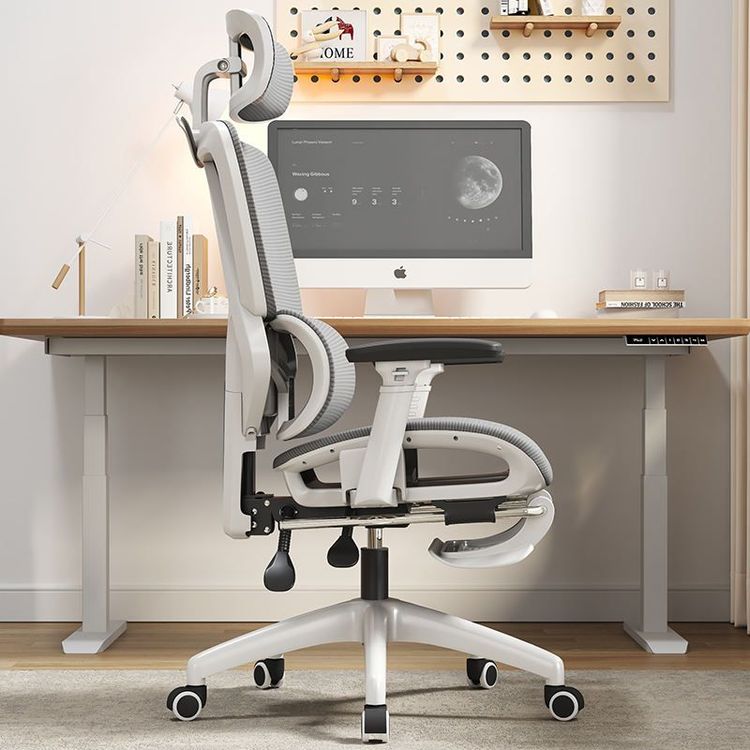
Random Adjustment of Office Chair
There are various ways to adjust an office chair, and you can choose the appropriate operation based on its specific functions. Here are common adjustment methods and some adjustment methods for chairs with special features:

I. Basic Adjustment Functions
Height Adjustment
Most office chairs control height via a handle beneath the seat. If the chair has a single handle, pulling it up compresses the high-pressure gas inside the air rod, raising the seat. To lower it, keep the handle pulled up while sitting down, using your body weight to prevent the gas from rebounding, allowing the seat to descend naturally. If the chair has two handles, determine which one controls the height through repeated attempts and then follow the above method. Some chairs use a lever design; after sitting down, lift the corresponding lever, and release it to secure the seat at the desired height.Fixed Screw Adjustment
Swivel chairs usually have fixed screws at the bottom for fine-tuning the seat's balance or stability. To adjust, turn the chair upside down, loosen the screws, adjust the seat's angle or levelness, and then retighten the screws after confirming the adjustment. This method is suitable for correcting a tilted or wobbly seat.
II. Advanced Adjustment Functions
Backrest Angle Adjustment
If the chair has two handles beneath it, the one not used for height adjustment usually controls the backrest angle. After sitting down, pull the handle and lean back to a comfortable position, then release the handle to lock the angle. Some chairs feature stepless adjustment design, allowing the backrest to automatically adapt to the tilt amplitude as the body moves.Headrest Adjustment
High-end chairs like the Qingxian Dynamic Ergonomic Chair support height and front-back position adjustments for the headrest. Pulling up the headrest changes its height, while pushing or pulling adjusts the front-back distance to accommodate the neck support needs of users of different heights. The dual-joint headrest of the Sihoo M59AS Pro chair achieves more precise height adjustment through rotation or sliding.
III. Special Function Adjustments
3D Linkage Armrests
Chairs like the Sihoo M59AS Pro are equipped with 3D armrests that support left-right rotation, front-back movement, and tilt adjustment. Users can adjust the armrest angle and position according to office scenarios (such as typing or reading) to reduce shoulder and neck strain. To adjust, find the control buttons or knobs beneath the armrests and push or rotate them to the desired state as needed.Dynamic Support Adjustment
Some chairs adopt a dynamic ergonomic design, such as the Qingxian Chair, whose seat cushion can float slightly as the body moves to disperse pressure. To adjust, confirm whether the chair is in "dynamic mode"; some models require switching between fixed and dynamic states via a bottom switch.
Precautions: Before adjusting, confirm the chair's structure to avoid damage from forced operation. If the chair remains unstable after adjustment, check whether the air rod or fixed components are aged and contact after-sales service for replacement in a timely manner.