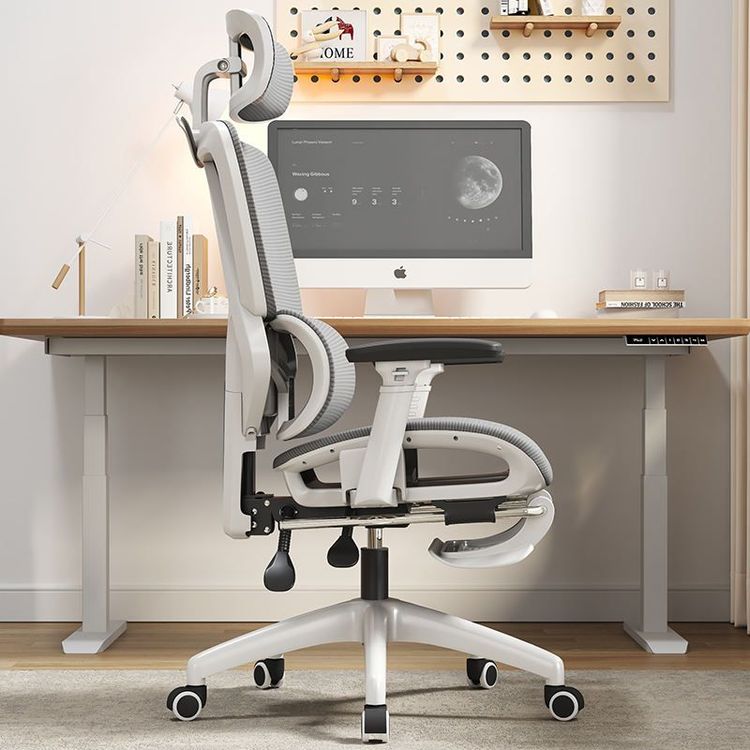
How to Choose the Right Office Chair Features
Choosing the right office chair features requires considering ergonomic design, comfort, and personalized needs, with a focus on the following key elements:

1. Posture Support
The primary function of an office chair is to maintain proper sitting posture and reduce pressure on the spine from prolonged sitting. Prioritize chairs with adjustable backrest angles, ideally in the range of 100°-110° for a slight recline, combined with an adjustable-height backrest to match the lower edge of the shoulder blades for users of different heights. Seat dimensions should meet ergonomic standards: seat height of 450-550mm (with feet flat on the floor and knees at a 90° angle), seat width of ≥380mm (to avoid hip compression), and seat depth of 400-440mm (leaving a 2-3 finger gap behind the thighs). Lumbar support is crucial; choose a chair with an adjustable-height lumbar support positioned at the L3-L5 vertebrae (approximately 250mm from the seat surface) to maintain the natural curve of the spine.
2. Cushion Quality
The cushion should balance support and comfort, avoiding excessive softness that causes the hips to sink or excessive firmness that creates pressure points. A high-quality cushion should have moderate elasticity and a concave curve design on the surface to distribute hip pressure evenly. Some premium models feature “memory foam” cushions that dynamically adjust to posture and weight, maintaining a good fit over long-term use. When testing, simulate prolonged sitting to check if the cushion edges cause leg circulation issues due to compression.
3. Backrest Comfort
The backrest should provide uniform support for the neck, lumbar region, shoulders, and hips. Mesh backrests are popular for their breathability, but ensure the mesh tension is even without sagging areas that could compromise support. For solid backrest chairs, pay attention to the density of the padding; excessive softness can leave the spine unsupported, while excessive firmness may press against the shoulder blades. During testing, check the fit between the backrest and back, especially ensuring no gaps in the lumbar area.
4. Adjustability
Personalized adjustability is key to accommodating different body types. Prioritize chairs with multi-dimensional adjustments: headrests that can be adjusted up/down and forward/backward to support the cervical spine; backrests with independent height and tilt angle adjustments; armrests that support up/down, left/right, and forward/backward movement to ensure elbows are at a 90° angle when arms hang naturally; and seat cushions with slight angle adjustments to suit different sitting postures (e.g., leaning forward for work or reclining for rest). Some models also offer seat depth sliding functionality for further thigh support optimization.
5. Ergonomic Design
For long-term use, choose chairs certified for ergonomic design, with core features including dynamic lumbar support, adjustable armrests (matching the width to the keyboard spacing), and multi-position recline locking (at least 3 positions recommended). Studies show that ergonomic chairs can reduce musculoskeletal pain by over 30% and improve work efficiency by 15%-20%. For extended desk work, consider chairs with a synchronized tilt mechanism that adjusts the backrest and seat angles together to maintain body balance.
6. Breathability (for Mesh Chairs)
For mesh chairs, prioritize material breathability by choosing high-density polyester fiber or 3D woven mesh with a porosity of ≥60% to ensure airflow. When testing, touch the back of the mesh; if it feels hot or damp, the breathability is insufficient. Additionally, the mesh edges should be reinforced to prevent sagging and deformation after long-term use.