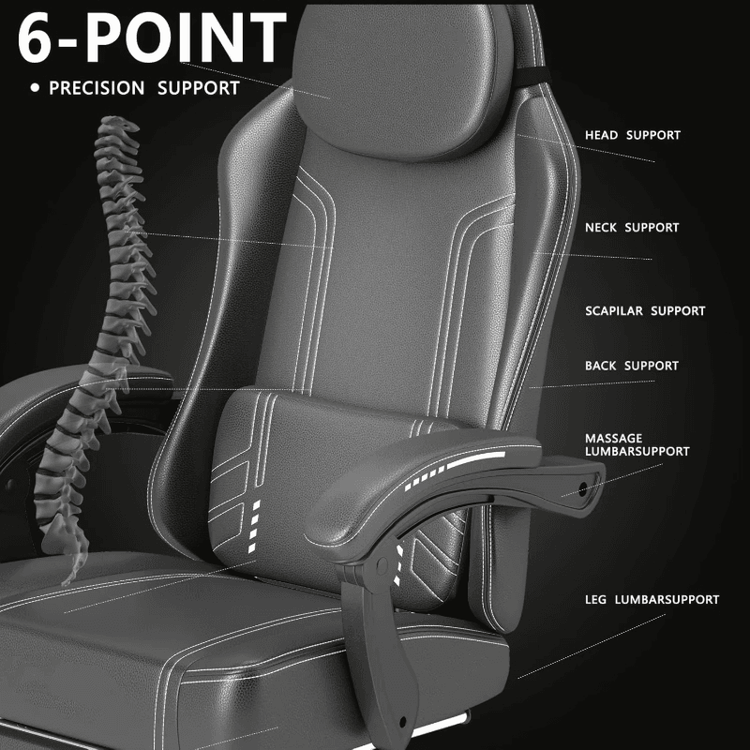
The Discomfort of Sitting in an Office Chair
The discomfort of sitting in an office chair can be alleviated by adjusting the seat, sitting posture, equipment position, and choosing an appropriate chair. Here are the specific methods:

Adjust the seat height: Adjust the seat height so that your thighs are parallel to the ground, your feet can rest flat on the ground, and your lower back can fit snugly against the backrest. This height ensures a reasonable distribution of body weight, reduces lower back pressure, and prevents body leaning forward or backward due to an excessively high or low seat, which can lead to lower back fatigue.
Maintain a correct sitting posture: Avoid crossing your legs to prevent uneven stress on your lower back. The height of the cushion should align with the L3 to L5 segments of your lower back. An ergonomic cushion should fill the concave part of your lower back, with a height between 20 and 25 centimeters. After placement, it should shift your pelvis from a posterior tilt to a neutral position, reducing intervertebral disc pressure. Adjust the depth of the seat cushion so that there is a three-finger gap between your thighs and the edge of the cushion, with your knees at the same height as your ischial tuberosities, your feet flat on the ground, and your knee joints maintained at 90 to 110 degrees, allowing the weight of your upper body to be evenly distributed on your ischial tuberosities. At the same time, keep your back straight and your shoulders relaxed.
Adjust the monitor height: The monitor height should be level with your line of sight, and can be slightly elevated by 2-3 cm to avoid looking down or raising your chin, keeping your neck relaxed and preventing the full weight of your upper body from pressing on your lower back.
Take regular breaks: After sitting for half an hour, lift your buttocks and stretch; every 45-60 minutes of work, get up and move around for 5-10 minutes, do some simple stretching exercises, walk around, or use a standing desk to promote blood circulation and relieve muscle fatigue.
Adjust the position of the keyboard and mouse: Move the keyboard and mouse as close to your body as possible by about 10 cm, allowing your arms to rest naturally on the desktop, relaxing your entire upper body and reducing fatigue in your shoulders and arms.
Choose an appropriate chair: The curvature of the chair, the hardness of the seat cushion, and the angle of the backrest can affect your lumbar spine. Before purchasing a chair, use the three-second test: check if your lower back naturally fits snugly against the backrest when sitting, and if your shoulders can be raised along a straight line without shrugging. Only chairs that pass these three screenings are suitable for long-term use.
Adopt a dynamic sitting posture: Every 20 minutes, perform a spinal reset exercise: clasp your hands behind your head and lean back while arching your lower back, holding for 5 seconds, then bend forward to touch your toes, holding for another 5 seconds. This activates the deep stabilizing muscles of your lower abdomen and inhibits fatigue.