
Back to blog
Article
Computer Office Chair Repair
Admin October 10, 2026
Computer office chair repair requires targeted measures based on specific issues:
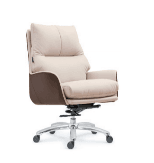
Tilting to One Side
- Check the Wheels: Place the chair upright and upside down to ensure each wheel foot contacts the ground evenly. Inspect for damage to the wheel feet. If the wheels are damaged, purchase matching new wheels by contacting the manufacturer for the model number or taking the old wheels to an office supply store for matching replacements.
- Remove Old Wheels: Pull the wheel foot directly by hand. If it cannot be pulled out, use a flat-head screwdriver inserted into the gap between the wheel foot and the chair as a lever. For a few wheels fixed with screws, use a screwdriver to loosen the screws before removal.
- Lubricate and Install: Apply a small amount of spray lubricant (such as WD-40) to the chair base socket. If unavailable, use petroleum jelly as a substitute and apply it to the wheel axle. Use a rubber mallet to tap the new wheel into the socket. Invert the chair to test if it still tilts. If the issue persists, check if the seat plate is damaged.
Swaying Side to Side
- Preparation for Repair: Gather tools such as screwdrivers, adjustable wrenches, hammers, pliers, white glue, lubricant, and rubber bands. Move the chair to a flat, open area, pad it with old cloth to prevent scratching the floor, secure the chair wheels to prevent sliding, disconnect the power if the chair has an electrical source, and avoid forced disassembly if the gas lift is abnormal.
- Identify the Swaying Location: Sit on the chair to feel the most noticeable swaying part. Focus on inspecting the screws on the inner side of the armrests, the bottom of the seat cushion, and the connection between the base and the gas lift. Test the smoothness of the gas lift's rotation and lifting, and check for looseness at the connection between the chair legs and the crossbar.
- Targeted Repairs:
- Loose Screws: Unscrew the screws counterclockwise, spray WD-40 for lubrication and rust removal, then tighten them clockwise. If the screw hole is worn, dip a toothpick in white glue and insert it into the hole. After it dries, reinsert the screw.
- Gas Lift Issues: Replace the gas lift if it is worn or leaking. Spray WD-40 on the connection, let it sit for 1 minute, heat it with a hairdryer, and use a heavy-duty pipe wrench to rotate and pull out the old lift counterclockwise. Clean the base mounting hole, insert the new lift, and tap it gently with a hammer to secure it.
- Base Deformation: Open the bottom cover to check for broken plastic clips or misaligned wheel axles. Use pliers to reset loose clips. If plastic parts are shattered or wheels are severely misaligned, replace the entire base assembly, ensuring to use the same model of compatible parts.
Other Issues
- Lifting Failure: Tighten the control knob or replace the gas lift. For severe damage, it is recommended to purchase original parts.
- Rotation Obstruction: Remove the rotating axle, clean it, and apply lubricant. Replace it with a new axle if severely worn.
- Mesh Fabric Damage: Repair small areas with a needle and thread. Replace with matching mesh fabric for large areas.
- Loose Chair Legs: Check and tighten the connecting screws. Replace them with new screws if damaged.
If self-repair is difficult or you are concerned about damaging parts, contact professional repair services. Exercise caution during repairs to avoid violent disassembly. It is advisable to consult the instruction manual or seek advice from professionals in advance.
Related


